TECHERICS
What Is WHOIS Lookup? How to Check Who Owns Any Domain (Free)
A WHOIS lookup shows who registered a domain, when it was created, and when it expires — free, with no signup. Learn how to check any domain in seconds.

Contents
- What is WHOIS?
- What a WHOIS lookup tells you
- Why the owner's name is usually hidden
- WHOIS vs RDAP — what is the difference?
- 5 real things to do with a WHOIS lookup
- 1. Check whether a website is trustworthy
- 2. Find out when a taken domain becomes available
- 3. Keep your own domains from expiring
- 4. Troubleshoot DNS problems
- 5. Report abuse or infringement
- How to check a domain — in 3 steps
- Step 1: Open the WHOIS Lookup tool
- Step 2: Type the domain name
- Step 3: Read the result
- What happens when a domain expires — the lifecycle
- Try it now
Every domain name has a record behind it — who registered it, when it was created, when it expires, and which company manages it. That record is public, and anyone can read it in seconds with a WHOIS lookup.
You have probably wanted this information at least once: a website looks suspicious and you want to know who runs it, a domain name you want is already taken and you want to know when it frees up, or your own domain is near expiry and you need to check the date. A WHOIS lookup answers all of that, for free, without signing up anywhere.
Try it as you read: WHOIS Domain Lookup
What is WHOIS?
WHOIS is a public directory of domain registrations. When someone registers a domain name — say, example.com — the registrar records details about that registration: the domain name itself, the registrar's name, the dates it was created and when it expires, the name servers it points to, and its current status.
A WHOIS lookup is simply a query against that directory. You type a domain name, and the lookup returns whatever the registry holds for it. It works for most domain extensions, including .com, .net, .org, .in, and hundreds of others, though a few country-code registries limit what they publish.
The name comes from the question it answers: 'who is' behind this domain. It was one of the earliest services on the internet, built in the days when the network was small enough that a single directory could list everyone on it. The internet has grown since then, but the idea is the same — a domain is a public address, and its registration record is public too.
What a WHOIS lookup tells you
A typical result has five kinds of information. Here is what each one means, and why you might care.
- Registrar — The company the domain was registered through. Tells you who to contact about the domain, and where it is managed.
- Created / Registration date — When the domain was first registered. An old domain is usually more established; a domain created yesterday deserves a second look.
- Expiry date — When the current registration period ends. Tells you when a taken domain might become available, or when yours needs renewal.
- Name servers — The DNS servers the domain points to. Shows where the website and email are hosted, useful for troubleshooting.
- Status — Codes like clientTransferProhibited or ok. Tells you whether the domain is locked against transfer, expired, or in a special state.
The TechErics tool shows all of this in one view, and it uses RDAP — the modern replacement for the old WHOIS protocol — to fetch the data. The difference matters, and it is explained in the WHOIS vs RDAP section below.
One thing a lookup will not reliably give you any more is the owner's personal name, email, or phone number. That is not a fault of the tool. It is privacy protection, and the next section explains why.
Why the owner's name is usually hidden
If you look up a domain today, you will often see REDACTED FOR PRIVACY where the owner's name and contact details used to be. This surprises people who remember the old days, when a WHOIS lookup showed the owner's full name, address, and phone number.
Two things changed that. First, privacy regulations such as the GDPR in Europe require registrars to protect personal data, so most registrars now hide it by default. Second, most registrars offer privacy protection as a standard feature, replacing the owner's details with the registrar's own proxy contact information.
This is good for domain owners — nobody wants their home address and phone number in a public directory. It is mildly inconvenient for everyone else, but it does not make WHOIS useless. The registrar, dates, name servers, and status are still public, and those four things answer most real questions about a domain.
If you genuinely need to reach a domain owner, the registrar usually provides a contact form or a privacy-protected email address that forwards your message to them. You will not get their personal email, but your message still reaches them.
WHOIS vs RDAP — what is the difference?
You may have seen the term RDAP next to WHOIS and wondered whether they are the same thing. They answer the same question, but they are different protocols.
WHOIS is the original system: a plain-text query that returns plain-text answers. Every registrar formatted its answers slightly differently, so reading a WHOIS result meant parsing free-form text, and automated tools had to guess where each field was.
RDAP — the Registration Data Access Protocol — is the modern replacement. It returns the same information as structured data, in a standard format that every registry follows. That means a tool can read the registrar, dates, and status reliably, without guessing, and it can show them in a clean table instead of a block of text.
In practice, the difference for you is simple: a lookup that uses RDAP gives you cleaner, more consistent results, especially across different domain extensions. The TechErics WHOIS tool uses RDAP for exactly that reason. You do not need to know which protocol is running underneath — but if a result looks tidier than an old WHOIS dump you remember, that is why.
5 real things to do with a WHOIS lookup
A lookup is not just trivia. Here are the five jobs people actually use it for.
1. Check whether a website is trustworthy
A shopping site or a link from a message looks off. Before you enter payment details, look up the domain. A site created a week ago, registered through a privacy service, with an expiry date a month away, is not proof of fraud — but combined with other warning signs, it is a reason to pause. A domain registered years ago with a stable registrar is no guarantee either, but it is one more piece of evidence in the site's favour.
2. Find out when a taken domain becomes available
The domain name you want is taken. The expiry date tells you when the current registration ends. If the owner does not renew, the domain does not become free the next morning — it goes through a lifecycle of grace and redemption stages first, explained below — but the expiry date is the starting point for watching it.
3. Keep your own domains from expiring
This is the most common real use, and the most expensive one to get wrong. If your domain expires and you miss the renewal window, your website and email stop working, and recovering the domain can cost far more than the renewal. A quick lookup once in a while, or a calendar reminder set from the expiry date, prevents all of it.
4. Troubleshoot DNS problems
Your website is down, or your email has stopped arriving. The name servers in a WHOIS result tell you where the domain is supposed to point. If they show the wrong host, or a host you moved away from months ago, you have found the problem — the DNS records need updating at the registrar the lookup names.
5. Report abuse or infringement
A domain is impersonating your brand, hosting copied content, or sending spam. The registrar named in the WHOIS result is the right place to send an abuse report, and the registration dates help establish when the problem started. Registrars are required to have an abuse contact, and a lookup is how you find which registrar to write to.
How to check a domain — in 3 steps
Step 1: Open the WHOIS Lookup tool
Open the WHOIS Domain Lookup tool. It is free, runs in your browser, and needs no account.
Step 2: Type the domain name
Enter any domain, such as example.com — no https://, no www, just the domain. Click the lookup button. The tool fetches the registration record through RDAP and shows the result in a structured view.
Step 3: Read the result
Start with the four fields that answer most questions: registrar, created date, expiry date, and status. The name servers tell you where the domain points. If a field says REDACTED FOR PRIVACY, that is the privacy protection described above, not missing data.
You can also cross-check what you find. If the lookup says a domain points to one host, an IP Address Lookup on that host tells you where the server actually sits — useful when a site claims to be somewhere it is not.
What happens when a domain expires — the lifecycle
A domain does not go from 'registered' to 'free' in one step. It passes through stages, and knowing them matters if you are waiting for a name or trying to recover one.
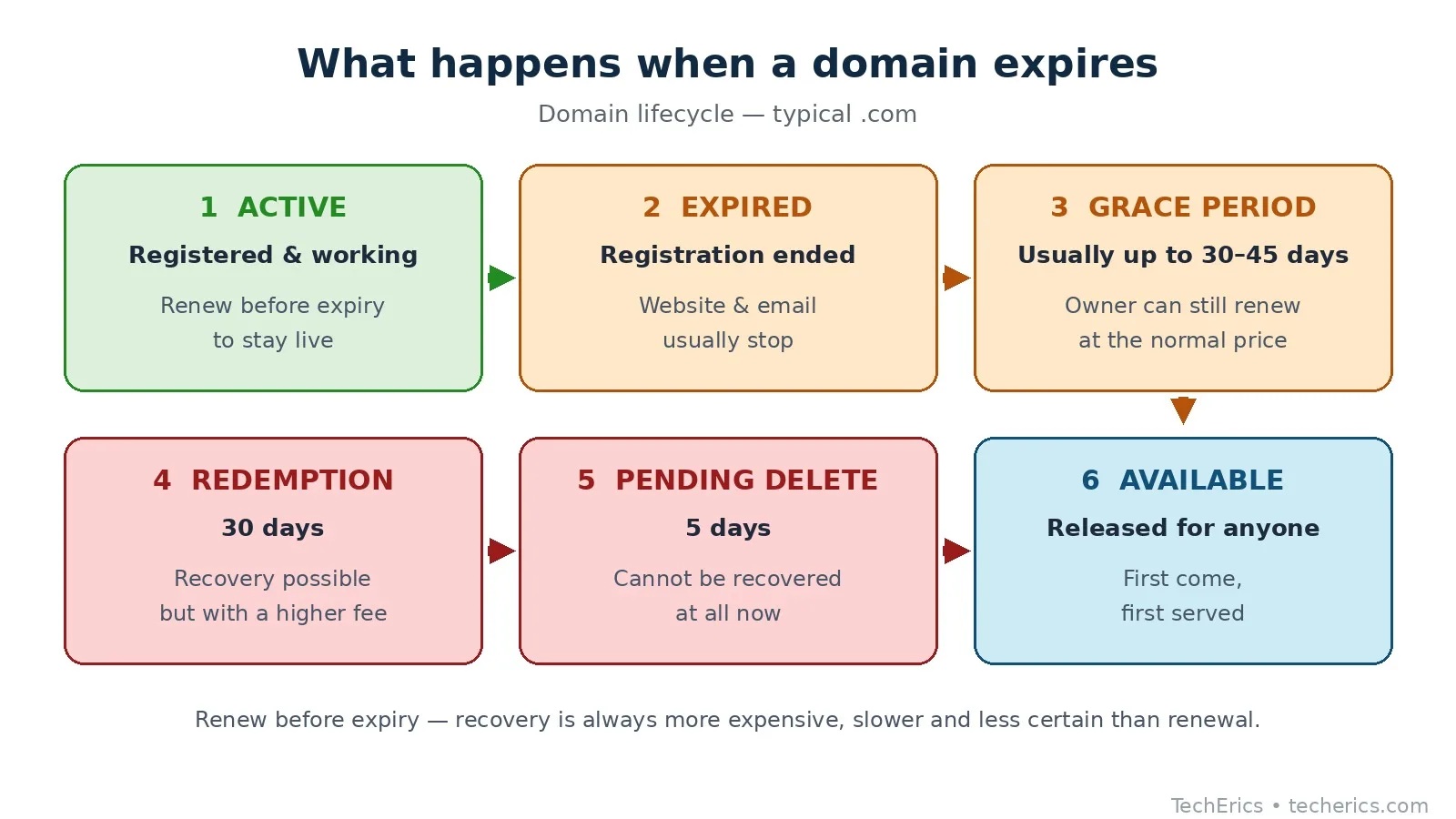
Active. The domain is registered and working. This is the normal state.
Expired. The registration period has ended and the owner did not renew in time. The website and email usually stop working at this point, though the owner can still renew.
Grace period. For a short window after expiry, the owner can still renew at the normal price. How long this lasts depends on the registrar and the extension — it is not the same everywhere, so check your registrar's policy rather than assuming a number.
Redemption period. If the grace period passes without renewal, the domain enters redemption. The owner can still get it back, but now there is usually a substantial recovery fee on top of the renewal price, and the process takes longer.
Pending delete. The final stage. The domain cannot be recovered at all now. After a few days it is released, and anyone can register it — usually on a first-come, first-served basis, which is why valuable names are often snapped up within seconds of release.
The practical lesson is simple: renew before expiry. Recovery is always more expensive, slower, and less certain than a renewal.
Try it now
A WHOIS lookup is a small tool that answers a big question: who is behind this domain, and how long have they been there. The next time a website looks unfamiliar, a domain you want is taken, or your own renewal date is approaching, the record is one search away.
Check any domain now — free WHOIS Lookup
Frequently asked questions
Can I find out who owns any domain with a WHOIS lookup?
Usually you can find the registrar and the registration details, but not the owner's personal name. Privacy protection and regulations like the GDPR mean personal details are hidden for most domains. The registrar, dates, name servers, and status are still public, and those answer most questions.
Is a WHOIS lookup legal?
Yes. Domain registration records are public by design, and looking them up is legal. What you do with the information still has to follow the law — using it to harass someone or to spam them is not.
Why does the result say REDACTED FOR PRIVACY?
The registrar is hiding the owner's personal details to protect their privacy, as required by data-protection law and as a standard feature of most registrations. It does not mean the domain is suspicious — most legitimate domains show this today.
How do I contact a domain owner if their details are hidden?
Use the registrar's contact form or the privacy-protected email address shown in the lookup result. Your message is forwarded to the owner without revealing their personal address. If the domain is used for abuse, report it to the registrar's abuse contact instead.
Does WHOIS work for every domain extension?
It works for most generic extensions like .com, .net, and .org, and for many country extensions like .in. A few country registries publish very little data or run their own lookup service. If a lookup returns nothing, try the registry's own WHOIS page for that extension.
How up to date is a WHOIS result?
The data comes from the registry and the registrar, so it is usually current to within hours of a change. If a domain was just registered or just transferred, allow a little time for the record to update everywhere.
Can I hide my own details in WHOIS?
Yes — most registrars include privacy protection for free or for a small fee, and many enable it by default. It replaces your name, email, and phone number with the registrar's proxy details. Check your registrar's domain settings to confirm it is on.
What should I do if a domain I want is taken but expired?
Note the expiry date from the lookup, then watch the domain through its grace and redemption stages — it is not available the day it expires. Set a reminder for a few weeks after the expiry date, and be ready to register it the moment it is released, because popular names go fast.